
Table of Contents
Each EQUISYM® sensor has several LEDs that indicate its status, battery level or location. Below are the main LEDs that you will encounter during your daily use of EQUISYM®. They have been divided into four categories:
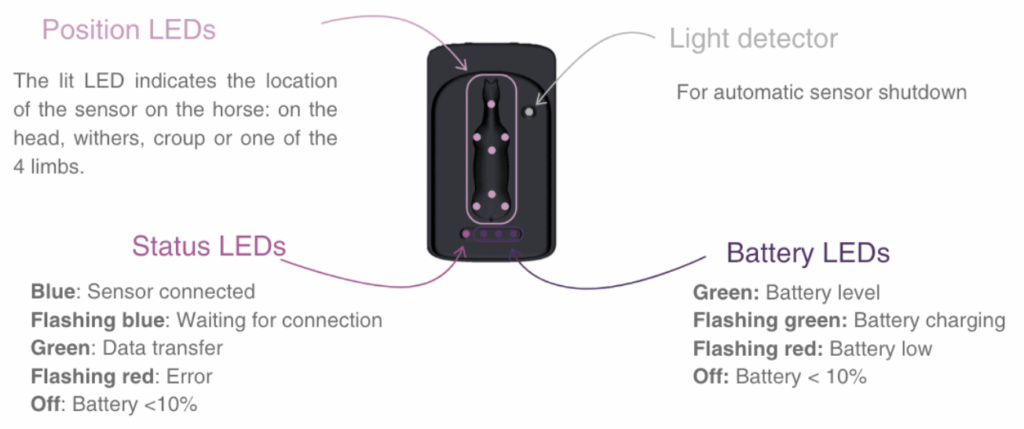
Status LED:
There can be multiple status at the same time. For example: flashing blue + flashing red = flashing purple.
- Solid Blue → Sensor is connected to BLE.
- Flashing Blue → Sensor is waiting for BLE connection.
- Solid Cyan → Sensor connected to WiFi.
- Flashing Cyan → Sensor waiting for WiFi connection.
- Solid Green → Data is being transferred from the sensors to the iPad.
- Fast Flashing Red → Error.
- No LED → Battery < 10%.
Battery LED:
For battery levels associated with each state – Solid Green LED(s) indicate the battery status. There is a specific question about “How to check the battery level of my sensors.”
- 3 Solid Green LEDs
- Charging → charged between 95 and 100%
- Not charging → charged between 80 and 100%
- 3 Flashing Green LEDs
- Charging → chargé entre 75% and 95%
- 2 Solid Green LEDs
- Not charging → charged between 45 and 80%
- 2 Flashing Green LEDs
- Charging → charged between 40 and 75%
- 1 Solid Green LED
- Not charging → charged between 20 and 45%
- 1 Flashing Green LED
- Charging → charged between 25 and 40%
- 1 Flashing Red LED (unable to start an exam)
- Not charging → charged between 10 and 20%
- Charging → charged between 0 and 25%
- No LED → Sensor is off because battery is < 10%.
- Not charging → Battery < 10%
If any of your LEDs display a blinking pattern or color that is not explained here, please feel free to contact our team at +33 9 70 19 26 80 or by email at contact@equisym.com.